
© ℗®™ Copyright symbol
Click a text symbol below to copy and paste c copyright symbol © C in circle, sound recording copyright credit symbol P in circle ℗, or registered trademark R in circle ®. Just click, or tap and they should copy right away 😉. Read info below to learn how you can just use your keyboard to text a copyright symbol on Mac, Windows alt code (copyright c alt code is 0169) and on Linux. Type copyright symbol on iPhone keyboard with just a combo of 3 letters - read below. If you're a webmaster you'd like knowing that copyright symbol html code is ©
Generally copyright sign (perceived by some as "copyright logo") is rendered as a black and white c in circle icon, not a colored icon - copyright emoji. A copyright notice, either as © c circled copyright symbol or phrase, informs users of the underlying claim to ownership credit for a published work. For sound recordings you should use produced ℗ symbol instead. Copyright protection is automatic upon creation of the work, though in some countries, including United States, there are some benefits for works officially registered. Currently, copyright applies for an extreme term of life plus 50 or more years in almost every country. Only a handful of countries don't offer protection to foreign works - almost all countries respect copyright. When a work's copyright term finally ends, the work passes into the public domain - becomes free to everyone. Note that copyright protects only specific expressions of an idea, not the idea itself. Some ideas can be protected by patents registered per country, or zone (like European Union) in appropriate Patent Offices for a several times shorter, although still unnecessarily long term in my opinion.
In the United States, the copyright notice consists of three elements:
- The © symbol, or the word 'Copyright' or abbreviation 'Copr.';
- The year of first publication of the copyrighted work;
- Identification of the owner of the copyright, either by name, abbreviation, or other designation by which it is generally known.
Copyright, or copywrite symbol?
Note, that correct way to spell the word for giving credit to the author is copyright, like copy right put together, while copywrite is not exactly a correct word. A copywriter is an occupation of writing text for the purpose of advertising or other forms of marketing including social media. For some reason the writing that's produced through copywriting is called a copy.
Copyright symbol on keyboard
Choose your platform and read a guide.
WindowsCopyright symbol on Windows Keyboard
Alt Code for copyright symbol
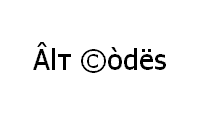
Keyboard shortcut technique that works on Windows Desktops and most Laptops running MS Windows. You press Alt and, while holding it, type a code on Num Pad while it's turned on. Please, watch my guide if you're running a laptop. You can type many frequently used symbols with this method.
| Alt code | Symbol |
|---|---|
| 0169 | © |
Shift States
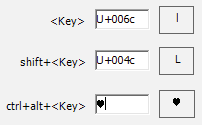
Configure your keyboard layout in Windows so that you can type all additional symbols you want as easy as any other text. Takes about 5-10 minutes to set things up, but you'll be typing like a boss. For example, you can assign copyright and produced symbols to be AltGr (right alt key) + C and AltGr + P.
Character Map
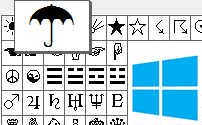
CharMap allows you to view and use all characters and symbols available in all fonts (some examples of fonts are "Arial", "Times New Roman", "Webdings") installed on your computer. You can input all symbols using it.
Copyright symbol on iPhone, iPad
Try typing (c) - just english letter c in round brackets. It should turn into the copyright symbol once you place some other character, like space, comma, or dot. Plus even before that, copyright sign will appear as a suggestion in predictions atop the keyboard. (r) produces a registered trademark symbol ®. Type (p) and hit a spacebar to get produced sign ℗ - also known as sound recording copyright symbol.
Keyboard viewer
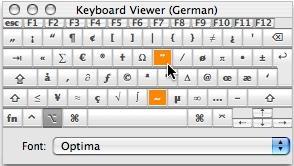
You can make frequently used technical non-fancy symbols like "√ ∑ π ∞ ∆ ™ © æ £ ¢" and åccénted letters on Mac using [Option] key. I've compiled a list of shortcuts in my article and explained how to open keyboard viewer. You can also use your Keyboard Viewer as an alternative to my list.
[Option] + [G] produces © copyright sign.
Character Palette
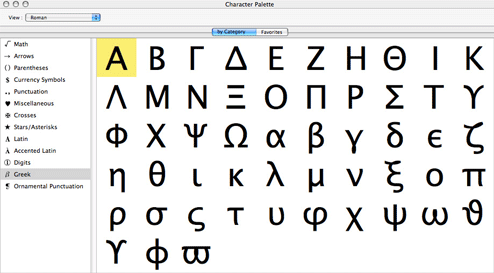
Character Palette allows you to view and use all characters and symbols, including copyright, available in all fonts (some examples of fonts are "Arial", "Times New Roman", "Webdings") installed on your computer.
Copyright on Linux Keyboard

| Unicode hex code | Symbol | Compose key sequence | Symbol |
|---|---|---|---|
| 00a9 | © | 0c | © |
| c0 | © | ||
| oc | © | ||
| co | © |
There actually are 3 different ways to type symbols on Linux with a keyboard. And all of them can produce copyright text symbols.
Character map
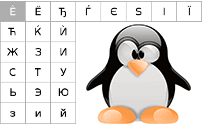
Character map allows you to view and use all characters and symbols available in all fonts (some examples of fonts are "Arial", "Times New Roman", "Webdings") installed on your computer. It can also help you lookup Unicode codes for entering symbols with keyboard.
Following is a list of HTML and JavaScript entities for copyright and produced symbols. In Javascript you should write like a = "this \u2669 symbol" if you want to include a special symbol in a string.
| HTML entity | JS entity | Symbol |
|---|---|---|
| © | \u00a9 | © |
| ℗ | \u2117 | ℗ |