
Music Symbols 🎸🤘🎼🎵♬ Note emoji
┼┼┼┼┼┼┼┼┼┼┼┼┼┼┼┼┼┼███┼┼┼┼┼┼┼┼┼┼┼┼
┼┼┼┼┼┼┼┼┼┼┼┼┼┼┼┼┼█║║║█┼┼┼┼┼┼┼┼┼┼┼
┼┼┼┼┼┼┼┼┼┼┼┼┼┼┼┼┼█║║║█┼┼┼┼┼┼┼┼┼┼┼
┼┼┼┼┼┼┼┼┼┼┼┼┼┼┼┼┼█║║║█┼┼┼┼┼┼┼┼┼┼┼
┼┼┼┼┼┼┼┼┼┼┼┼┼┼┼┼┼█║║║█┼┼┼┼┼┼┼┼┼┼┼
┼┼┼┼┼┼┼┼┼┼┼┼┼┼┼┼┼█████┼┼┼┼┼┼┼┼┼┼┼
┼┼███┼┼┼┼┼┼┼┼┼┼┼┼█║║║█┼┼┼┼┼┼┼┼┼┼┼
┼█║║║█┼┼┼┼┼┼┼┼┼┼┼█║║║█┼┼┼┼┼┼┼┼┼┼┼
┼█║║║█┼┼┼┼┼┼┼┼┼┼┼█║║║█┼┼┼┼┼┼┼┼┼┼┼
┼█║║║█┼┼┼┼┼┼┼┼┼┼┼█║║║█┼┼┼┼┼┼┼┼┼┼┼
┼█║║║█┼┼┼┼┼┼┼┼┼┼┼█████┼┼┼┼┼┼┼┼┼┼┼
┼█████┼┼┼┼┼┼┼┼┼┼┼█║║║█┼┼┼┼┼┼┼┼┼┼┼
┼█║║║█┼┼┼┼┼┼┼┼┼┼┼█║║║█┼┼┼┼┼┼┼┼┼┼┼
┼█║║║█┼┼┼┼┼┼┼┼┼┼┼█║║║█┼┼┼┼┼┼┼┼┼┼┼
┼█║║║█┼┼┼┼┼┼┼┼┼┼┼█║║║█┼┼┼┼┼┼┼┼┼┼┼
┼█║║║█┼┼┼┼┼┼┼┼████║║║█┼┼┼┼┼┼┼┼┼┼┼
┼█████┼┼████┼█║║║██║║█┼┼┼┼┼┼┼┼┼┼┼
┼█║║║█┼█║║║║█║║║║║████┼┼┼┼┼┼┼┼┼┼┼
┼█║║║█┼█║║║║█║║║║║████┼┼┼┼┼┼┼┼┼┼┼
┼█║║║███║║║║█║║║║║█║║█┼┼┼┼┼┼┼┼┼┼┼
┼█║║║██║║║║█║║║║║█║║║█┼┼┼┼┼┼┼┼┼┼┼
┼██████║║║║█║║║║║█║║║█┼┼┼┼┼┼┼┼┼┼┼
┼██║║║█║║║║█║║║║║█║║║█┼┼┼┼┼┼┼┼┼┼┼
┼█║║║║█║║║║█║║║║██║║║█┼┼┼┼┼████┼┼
┼█║║║║█║║║║█║║║║█║║║║█┼┼┼┼██║║██┼
┼█║║║║█║║║║█║║║║█║║║║█┼┼┼██║║║║█┼
┼█║║║║█║║║║█║║║║█║║║║█┼┼██║║║║║█┼
┼█║║║║█║║║║█║║║║█║║║║█┼██║║║║║██┼
┼█║║║║███████████║║║║███║║║║║██┼┼
┼█║║║║█║║║║█║║║║█║║║║██║║║║║██┼┼┼
┼█║║║║█║║║║█║║║║█║║║║██║║║║██┼┼┼┼
┼█║║║║█║║║║█║║║║█║║║║██║║║██┼┼┼┼┼
┼█║║║║█║║║║█║║║║█║║║║██║║██┼┼┼┼┼┼
┼█║║║║█║║║║█║║║║█║║║║██║██┼┼┼┼┼┼┼
┼█║║║║███████████║║║║████┼┼┼┼┼┼┼┼
┼█║║║║║████║████║║║║║███┼┼┼┼┼┼┼┼┼
┼█║║║║║║║║║║║║║║║║║║║██┼┼┼┼┼┼┼┼┼┼
┼█║║║║║║║║║║║║║║║║║║║██┼┼┼┼┼┼┼┼┼┼
┼█║║║║║║║║║║║║║║║║║║██┼┼┼┼┼┼┼┼┼┼┼
┼█║║║║║║║║║║║║║║║║║██┼┼┼┼┼┼┼┼┼┼┼┼
┼█║║║║║║║║║║║║║║║║██┼┼┼┼┼┼┼┼┼┼┼┼┼
┼█║║║║║║║║║║║║║║██┼┼┼┼┼┼┼┼┼┼┼┼┼┼┼
┼┼███████████████┼┼┼┼┼┼┼┼┼┼┼┼┼┼┼┼
┼┼┼█████████████┼┼┼┼┼┼┼┼┼┼┼┼┼┼┼┼┼
┼┼┼█║║║║║║║║║║║█┼┼┼┼┼┼┼┼┼┼┼┼┼┼┼┼┼
┼┼┼█║║║║║║║║║║║█┼┼┼┼┼┼┼┼┼┼┼┼┼┼┼┼┼
┼┼┼█║║║║║║║║║║║█┼┼┼┼┼┼┼┼┼┼┼┼┼┼┼┼┼
┼┼┼█║║║║║║║║║║║█┼┼┼┼┼┼┼┼┼┼┼┼┼┼┼┼┼
┼┼┼█║║║║║║║║║║║█┼┼┼┼┼┼┼┼┼┼┼┼┼┼┼┼┼
┼┼┼█║║║║║║║║║║║█┼┼┼┼┼┼┼┼┼┼┼┼┼┼┼┼┼
┼┼┼█║║║║║║║║║║║█┼┼┼┼┼┼┼┼┼┼┼┼┼┼┼┼┼
┼┼┼█║║║║║║║║║║║█┼┼┼┼┼┼┼┼┼┼┼┼┼┼┼┼┼
┼┼┼┼█║║║║║║║║║█┼┼┼┼┼┼┼┼┼┼┼┼┼┼┼┼┼┼
┼┼┼┼┼█████████┼┼┼┼┼┼┼┼┼┼┼┼┼┼┼┼┼┼┼
Copy and paste music symbols and other music-related emoji and text from here. All the best music note symbols and musical emoji signs I could find are here. 🎵🎸
In music, notes denote a relative durations and pitch of sounds. Notes are the "atoms" of Western music. There's a lot more than just notes to the sound of the music. But in the old times, it was more practical to just write what instrument the one was playing and which notes he was going to play. The whole music performance will differ slightly from person to person from performance to performance, but the music notes provide a backbone for melody.
How to input music symbols
Choose your system to find out.
WindowsFrom Keyboard
Alt Codes
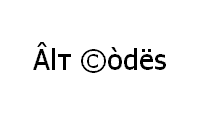
Shortcut technique that works on Desktops and most Laptops running MS Windows. You press Alt and, while holding it, type a code on Num Pad while it's turned on. Please, watch my guide if you're running a laptop. You can type many frequently used symbols with this method.
| Alt code | Symbol |
|---|---|
| 13 | ♪ |
| 14 | ♫ |
Shift States
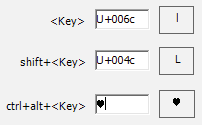
Configure your keyboard layout in Windows so that you can type all additional symbols you want as easy as any other text. Takes about 5-10 minutes to set things up, but you'll be typing like a boss. You can assign all possible music symbols (♩ ♪ ♫ ♬ ♭ ♮ ♯) and any other text characters to your keyboard using this technique.
Character Map
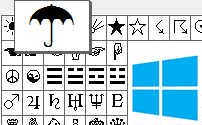
CharMap allows you to view and use all characters and symbols available in all fonts (some examples of fonts are "Arial", "Times New Roman", "Webdings") installed on your computer. You can input all music note symbols using it.
Emoji on iOS (iPhone, iPad and iPod touch)
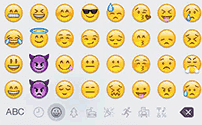
Character Palette
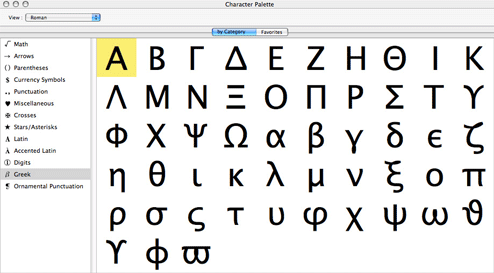
Character Palette allows you to view and use all characters and symbols, including music symbols, available in all fonts (some examples of fonts are "Arial", "Times New Roman", "Webdings") installed on your computer.
From Keyboard
| Unicode hex code | Symbol | Unicode hex code | Symbol |
| 2669 | ♩ | 266A | ♪ |
| 266B | ♫ | 266C | ♬ |
| 266D | ♭ | 266E | ♮ |
| 266F | ♯ |
There actually are 3 different ways to type symbols on Linux with a keyboard. But only Unicode hex codes can produce music note text symbols. With this method, you can type all the music symbols and all the other possible text symbols.
Character map
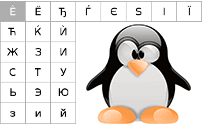
Character map allows you to view and use all characters and symbols available in all fonts (some examples of fonts are "Arial", "Times New Roman", "Webdings") installed on your computer. It can also help you lookup Unicode codes for entering symbols with keyboard.
Following is a list of HTML and JavaScript entities for music note symbols. In Javascript, you should write like a = "this \u2669 symbol" if you want to include a special symbol in a string.
| HTML entity | JS entity | Symbol | HTML entity | JS entity | Symbol |
|---|---|---|---|---|---|
| ♩ | \u2669 | ♩ | ♭ | \u266d | ♭ |
| ♪ | \u266a | ♪ | ♮ | \u266e | ♮ |
| ♫ | \u266b | ♫ | ♯ | \u266f | ♯ |
| ♬ | \u266c | ♬ |