
Paragraph symbol § ¶ Pilcrow
Click a pilcrow or paragraph symbol below to copy and paste. For keyboard shortcut for text pilcrow symbol and paragraph symbol read info below.
| Paragraph | ¶ | § |
|---|
Paragraph symbol meaning
 These text symbols aren't very popular today. For the biggest part, I find paragraph signs when I get some formatting problems in MS Word. I sometimes see paragraph sign, in books and law stuff. And that's all. You can hardly see it on Facebook, Instagram or YouTube. People seem to be forgetting and displacing it with other notations. Ahh.. I think, the life gets better.. ^.^

Paragraph sign (from the Greek paragraphos, 'to write beside' or 'written beside') is a self-contained unit of a discourse in writing dealing with a particular point or idea.
The pilcrow symbol ¶, also called the paragraph mark, paragraph sign, paraph, or alinea (Latin: a linea, 'off the line'), is a typographical character commonly used to denote individual paragraphs. The pilcrow can be used as an indent for separate paragraphs or to designate a new paragraph in one long piece of copy, as Eric Gill did in his 1930s book, An Essay on Typography. The pilcrow was used in the Middle Ages to mark a new train of thought, before the convention of physically discrete paragraphs was a common practice.
In German, Ukrainian and Russian as well as some other languages section sign § is called paragraph. While English "paragraph" is called abzats/absatz. This can lead to misunderstandings.
Paragraph and pilcrow keyboard shortcuts
Choose your system and find out.
WindowsFrom Keyboard
Alt Codes
Shortcut technique that works on Desktops and most Laptops running MS Windows. You press Alt and, while holding it, type a code on Num Pad while it's turned on. Please, read a guide if you're running a laptop. You can type many frequently used symbols with this method.
| Alt code | Symbol |
|---|---|
| 20 | ¶ |
| 21 | § |
Shift States
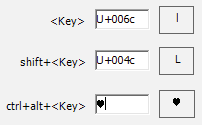
Configure your keyboard layout in Windows so that you can type all additional symbols you want as easy as any other text. Takes about 5-10 minutes to set things up, but you'll be typing like a boss. You can assign paragraph symbols ¶ and any other text characters to your keyboard using this technique.
Character Map
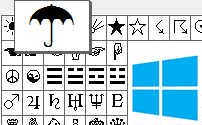
CharMap allows you to view and use all characters and symbols available in all fonts (some examples of fonts are "Arial", "Times New Roman", "Webdings") installed on your computer. You can input paragraph symbols using it.
Keyboard viewer
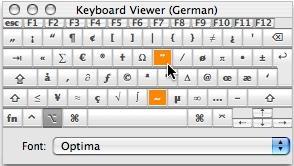
You can make frequently used technical non-fancy symbols like "√ ∑ π ∞ ∆ ™ © æ £ ¢" and åccénted letters on Mac using [Option] key. I've compiled a list of shortcuts in my article and explained how to open keyboard viewer. You can also use your Keyboard Viewer as an alternative to my list.
[Option] + [6] produces ¶ paragraph sign and [Option] + [7] produces § pilcrow sign.
Character Palette
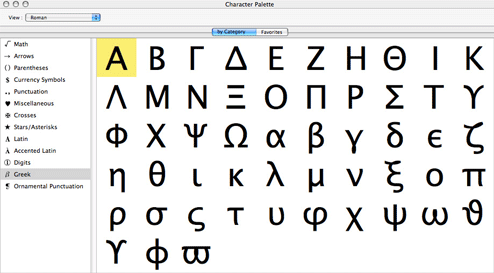
Character Palette allows you to view and use all characters and symbols, including paragraph, available in all fonts (some examples of fonts are "Arial", "Times New Roman", "Webdings") installed on your computer.
From Keyboard
| Unicode hex code | Symbol | Compose key sequence | Symbol |
|---|---|---|---|
| 00b6 | ¶ | !p | ¶ |
| 00a7 | § | p! | ¶ |
| 0s | § | ||
| s0 | § | ||
| os | § | ||
| so | § |
There actually are 3 different ways to type symbols on Linux with a keyboard. And all of them can produce paragraph text symbols.
Character map
Character map allows you to view and use all characters and symbols available in all fonts (some examples of fonts are "Arial", "Times New Roman", "Webdings") installed on your computer. It can also help you lookup Unicode codes for entering symbols with keyboard.
Following is a list of HTML and JavaScript entities for paragraph symbols. In Javascript you should write like a = "this \u2669 symbol" if you want to include a special symbol in a string.
| HTML entity | JS entity | Symbol |
|---|---|---|
| ¶ | \u00b6 | ¶ |
| § | \u00b7 | § |